MiniMe Skins not working correctly

Discuss all aspects related to modding Zandronum here.
Post Reply
User avatar
DevilHunter
Zandronum Tester
Posts: 635
Joined: Sun Jun 17, 2012 12:58 am
Location: Alaska, USA
Contact:

MiniMe Skins not working correctly

#1

Post by DevilHunter » Fri Feb 28, 2014 4:59 pm

In the RBCSkins pack released by Voltlock back in the Skulltag days, there is a Skin.. Well, not really one, but its the Doom Marine, only scaled down.

However, I just now noticed that it does not work anymore. Instead, a Pixalated Shotgun Raise Sprite plays in a loop when "MiniMe" is selected. It works correctly in Skulltag, but in Zandronum, it don't.

All it is for Minime is...

Code: Select all

{
name="Minime"
scale=0.7
}
This is in the SKININFO lump in RBCSkins11-qf. And has been in every version of RBCSkins that I remember. So if anyone can figure out why this happens, let me know.

Here is the link to the Wad

I can't remember if Voltlock made RBCSkin12 with the ST Skins in there. It was either I, or Him that did it. But in RBCSkin12, this still happens.

And before you ask, Yes I tried reinstalling Zandronum. I tried removing all my Announcers, Skins, Configs, and whatever else from the Zandronum Folder. Yes I tried loading Skulltag_Data/Actors with it.

This is only a minor problem however, I can just remove the entry from Skininfo if I want.
User avatar
-Jes-
Frequent Poster Miles card holder
Posts: 975
Joined: Fri Aug 03, 2012 9:55 am
Location: Void Zone

RE: MiniMe Skins not working correctly

#2

Post by -Jes- » Fri Feb 28, 2014 8:18 pm

Something did indeed change in Zandro - enough to make skins that do not define a sprite name not actually default to PLAY.

But the really odd part about it is, that it's not consistent about it.

+lol brane
Last edited by -Jes- on Mon Mar 03, 2014 1:45 am, edited 1 time in total.

User avatar
DevilHunter
Zandronum Tester
Posts: 635
Joined: Sun Jun 17, 2012 12:58 am
Location: Alaska, USA
Contact:

RE: MiniMe Skins not working correctly

#3

Post by DevilHunter » Sun Mar 02, 2014 6:52 am

So.. Nobody else knows whats going on? Perhaps Torr might chime in here.. Idunno. I know I said its no biggie, but it still is somewhat an issue...

User avatar
CloudFlash
Zandrone
Posts: 1074
Joined: Mon Jun 04, 2012 5:35 pm
Location: Wonderland (except not really)

RE: MiniMe Skins not working correctly

#4

Post by CloudFlash » Sun Mar 02, 2014 8:08 am

I suggest copying Doomguy's states set and pasting it into Minime.
https://i.imgflip.com/i5tpe.jpg
*Hey, who wants to hear my solution to the modern world's problems? ^Me! %Me! @Me! #Me! *WELL TOO BAD @Did he just stab himself with this butcher knife? %Looks like it ^Hey, the pizza guy arrived! %Pizza! Yey

User avatar
DevilHunter
Zandronum Tester
Posts: 635
Joined: Sun Jun 17, 2012 12:58 am
Location: Alaska, USA
Contact:

RE: MiniMe Skins not working correctly

#5

Post by DevilHunter » Sun Mar 02, 2014 4:29 pm

If only I knew how to do that.. I tried using the Stock PLAYA sprite, but it don't scale down as it should.

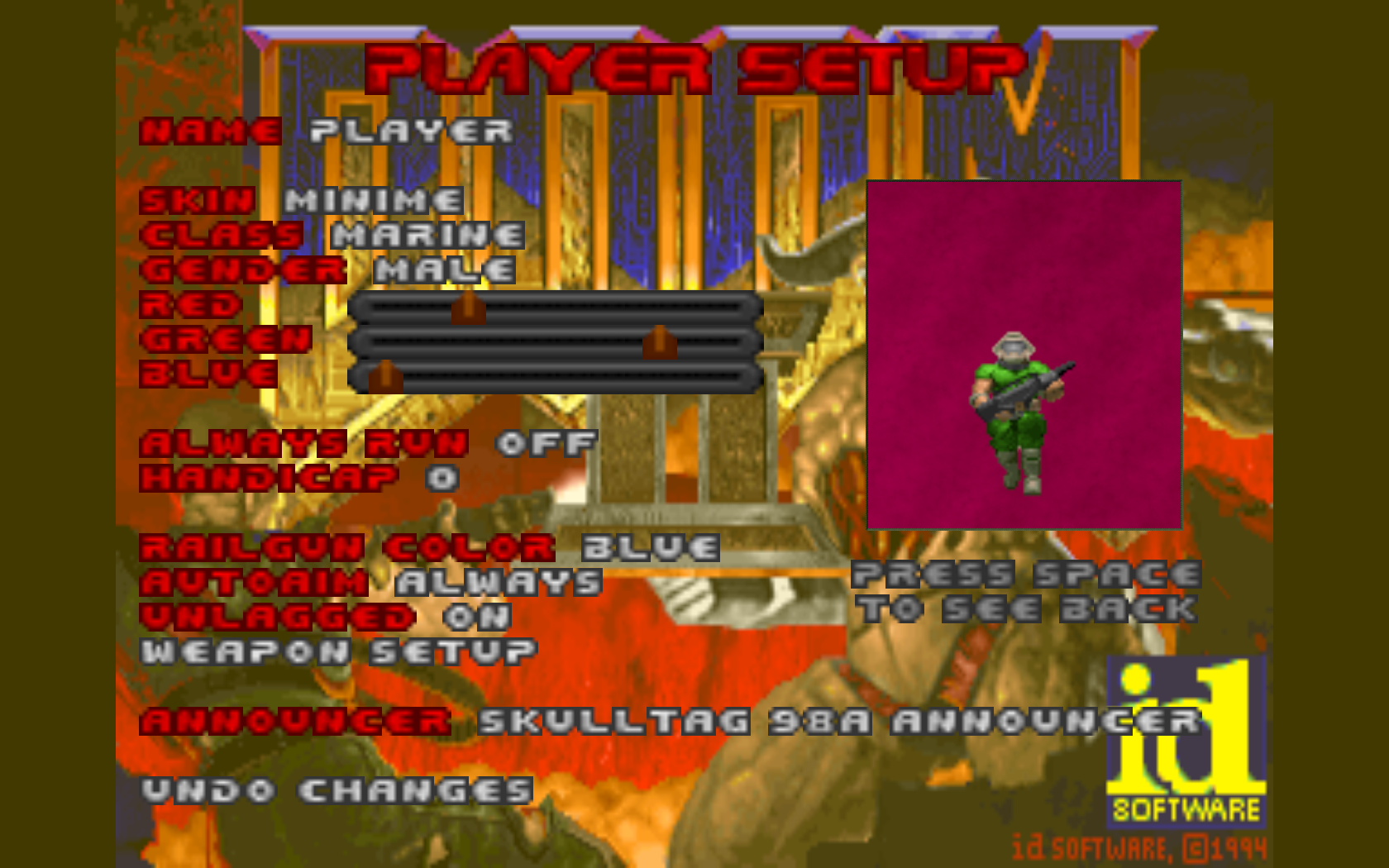
Here is what its suppose to look like.. (taken in Skulltag)
Spoiler: WARNING: 1680x1050 Res here (Open)
Image
yes, those are stock settings. I haven't bothered to fix Skulltag back up since reinstalling it.

User avatar
Ænima
Addicted to Zandronum
Posts: 3583
Joined: Tue Jun 05, 2012 6:12 pm

RE: MiniMe Skins not working correctly

#6

Post by Ænima » Sun Mar 02, 2014 8:13 pm

Meepy has the same problem. Apparently you can't make skins that use the stock PLAY sprite unless you actually include the full PLAY set with it. It didn't use to be this way (as evidence by the fact that Meepy worked fine in Skulltag, now he's invisible ingame).
Reinforcements: midgame Survival joining/respawning
Doom64: Unabsolved: Doom64 + Diablo II
ZandroSkins: a pack made by our community
AeniPuffs: 3D blood and bullet puff effects, free to use for your own mods
Squad Radio: a WASD-based radio chat menu, add your own custom sounds!
Mercenaries (on hold)
Image

User avatar
CloudFlash
Zandrone
Posts: 1074
Joined: Mon Jun 04, 2012 5:35 pm
Location: Wonderland (except not really)

RE: MiniMe Skins not working correctly

#7

Post by CloudFlash » Sun Mar 02, 2014 8:46 pm

Okay, here is what you do:
1: Open the RBCskins with XWE / whatever you want to use.
2: Paste this below 'scale 0.7':

Code: Select all

 States
  {
  Spawn:
    PLAY A -1
    Loop
  See:
    PLAY ABCD 4 
    Loop
  Missile:
    PLAY E 12 
    Goto Spawn
  Melee:
    PLAY F 6 BRIGHT
    Goto Missile
  Pain:
    PLAY G 4 
    PLAY G 4 A_Pain
    Goto Spawn
  Death:
    PLAY H 0 A_PlayerSkinCheck("AltSkinDeath")
  Death1:
    PLAY H 10
    PLAY I 10 A_PlayerScream
    PLAY J 10 A_NoBlocking
    PLAY KLM 10
    PLAY N -1
    Stop
  XDeath:
    PLAY O 0 A_PlayerSkinCheck("AltSkinXDeath")
  XDeath1:
    PLAY O 5
    PLAY P 5 A_XScream
    PLAY Q 5 A_NoBlocking
    PLAY RSTUV 5
    PLAY W -1
    Stop
}
3: Save and enjoy.

(or just put 'sprite = PLAY' somewhere in Minime's properties. Not sure if will work, tho.)
https://i.imgflip.com/i5tpe.jpg
*Hey, who wants to hear my solution to the modern world's problems? ^Me! %Me! @Me! #Me! *WELL TOO BAD @Did he just stab himself with this butcher knife? %Looks like it ^Hey, the pizza guy arrived! %Pizza! Yey

User avatar
Ænima
Addicted to Zandronum
Posts: 3583
Joined: Tue Jun 05, 2012 6:12 pm

RE: MiniMe Skins not working correctly

#8

Post by Ænima » Sun Mar 02, 2014 10:41 pm

WAT

Why would you paste DECORATE into SKININFO?
Reinforcements: midgame Survival joining/respawning
Doom64: Unabsolved: Doom64 + Diablo II
ZandroSkins: a pack made by our community
AeniPuffs: 3D blood and bullet puff effects, free to use for your own mods
Squad Radio: a WASD-based radio chat menu, add your own custom sounds!
Mercenaries (on hold)
Image

User avatar
Slim
Zandrone
Posts: 1112
Joined: Sat Mar 16, 2013 7:11 am
Location: Zero Space
Clan: Can't fit it in here
Clan Tag: -=FSR=-
Contact:

RE: MiniMe Skins not working correctly

#9

Post by Slim » Mon Mar 03, 2014 12:12 am

CloudFlash wrote: Okay, here is what you do:
1: Open the RBCskins with XWE / whatever you want to use.
2: Paste this below 'scale 0.7':

Code: Select all

 States
  {
  Spawn:
    PLAY A -1
    Loop
  See:
    PLAY ABCD 4 
    Loop
  Missile:
    PLAY E 12 
    Goto Spawn
  Melee:
    PLAY F 6 BRIGHT
    Goto Missile
  Pain:
    PLAY G 4 
    PLAY G 4 A_Pain
    Goto Spawn
  Death:
    PLAY H 0 A_PlayerSkinCheck("AltSkinDeath")
  Death1:
    PLAY H 10
    PLAY I 10 A_PlayerScream
    PLAY J 10 A_NoBlocking
    PLAY KLM 10
    PLAY N -1
    Stop
  XDeath:
    PLAY O 0 A_PlayerSkinCheck("AltSkinXDeath")
  XDeath1:
    PLAY O 5
    PLAY P 5 A_XScream
    PLAY Q 5 A_NoBlocking
    PLAY RSTUV 5
    PLAY W -1
    Stop
}
3: Save and enjoy.

(or just put 'sprite = PLAY' somewhere in Minime's properties. Not sure if will work, tho.)
It's a skin, not a monster. :P
Image

"Your childish antics grow tiring. If you dare to fight me, then I accept your challenge: Anytime, anywhere." - Zero, Megaman X5
Spoiler: Quotes (Open)
5:54 PM - Slim: you're complaining about something so small that
5:54 PM - Lance: so? we do that all the time
5:55 PM - Lance: we're a bunch of losers complaining at a bar minus the bar
Spoiler: Galactus tried evading (Open)
Image

User avatar
Ivan
Addicted to Zandronum
Posts: 2229
Joined: Mon Jun 04, 2012 5:38 pm
Location: Omnipresent

RE: MiniMe Skins not working correctly

#10

Post by Ivan » Mon Mar 03, 2014 1:57 am

And this is why we don't trust him about his suggestions about 99% of the time.

On topic, check how I did the Arnold skin. It had the exact same issue you described and it was solved by simplying providing the player sprites from the IWAD itself.
=== RAGNAROK DM ON ... uh... dead forever? ===
=== ALWAYS BET ON ... uh... dead forever? ===
=== Who wanta sum wang? ===
=== Death and Decay - A new Monster/Weapon replacer ===

User avatar
DevilHunter
Zandronum Tester
Posts: 635
Joined: Sun Jun 17, 2012 12:58 am
Location: Alaska, USA
Contact:

RE: MiniMe Skins not working correctly

#11

Post by DevilHunter » Mon Mar 03, 2014 9:00 am

Welp.. I took the sprites from Arnoldskin, and put "sprite = PLAY" into MiniMe's Spot in Skininfo, loaded it up, and it works..

I still don't see why this happens. Something in Zandro is fucked.. Perhaps I will make a ticket but.. idunno. If any of you want to, go ahead, because I will probably forget to.

Anyhow.. if anyone cares to get the Hotfix Version, I can upload it no prob.

As for now.. Case Closed.. somewhat

User avatar
Torr Samaho
Lead Developer
Posts: 1543
Joined: Fri May 25, 2012 6:03 pm
Location: Germany

RE: MiniMe Skins not working correctly

#12

Post by Torr Samaho » Thu Mar 06, 2014 5:50 pm

DevilHunter wrote: Perhaps I will make a ticket but..
If something that worked in Skulltag doesn't work anymore in Zandronum please open a ticket. I will look into it eventually.

User avatar
DevilHunter
Zandronum Tester
Posts: 635
Joined: Sun Jun 17, 2012 12:58 am
Location: Alaska, USA
Contact:

RE: MiniMe Skins not working correctly

#13

Post by DevilHunter » Thu Mar 06, 2014 10:15 pm

Torr Samaho wrote:
DevilHunter wrote: Perhaps I will make a ticket but..
If something that worked in Skulltag doesn't work anymore in Zandronum please open a ticket. I will look into it eventually.
http://zandronum.com/tracker/view.php?id=1734

Done.

Post Reply