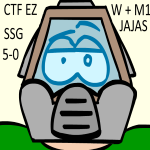
I'd like someone to make this into a model so that I can use it as a floor aligned actor. I have absolutely no idea how to make it, I tried blender and miserably failed after messing with it for 2.5 hours, so I'd really appreciate some help here. I also provided the other 3 images for the animation. (Not sure if it's needed or doable, I really don't know)
The image
Help making model
Help making model
=== RAGNAROK DM ON ... uh... dead forever? ===
=== ALWAYS BET ON ... uh... dead forever? ===
=== Who wanta sum wang? ===
=== Death and Decay - A new Monster/Weapon replacer ===
=== ALWAYS BET ON ... uh... dead forever? ===
=== Who wanta sum wang? ===
=== Death and Decay - A new Monster/Weapon replacer ===
RE: Help making model
You post could use some structure, I have no idea what you are really asking for. Do you have problems with making the model? Animating it? Applying the model to the actor?
You have to be very clear, but in case it is a problem that concerns the use of blender itself, all you can really do is look up some basic information on how to use the program.
You have to be very clear, but in case it is a problem that concerns the use of blender itself, all you can really do is look up some basic information on how to use the program.
Combinebobnt wrote:i can see the forum league is taking off much better than the ctf ones
GalactusToday at 1:07 PM
are you getting uncomfortable jap
feeling something happen down there
RE: Help making model
I just want someone to make this into UV mapped model so that I can use this as a floor aligned actor, much like the blood effects in Brutal Doom.
=== RAGNAROK DM ON ... uh... dead forever? ===
=== ALWAYS BET ON ... uh... dead forever? ===
=== Who wanta sum wang? ===
=== Death and Decay - A new Monster/Weapon replacer ===
=== ALWAYS BET ON ... uh... dead forever? ===
=== Who wanta sum wang? ===
=== Death and Decay - A new Monster/Weapon replacer ===

RE: Help making model
Wat
It's not UV mapping, just a single-plane model.
Go ahead and use SST's blood pool model and use your images as model skins. Incase you don't feel like doing 2 steps in MM3D. :p
It's not UV mapping, just a single-plane model.
Go ahead and use SST's blood pool model and use your images as model skins. Incase you don't feel like doing 2 steps in MM3D. :p
Reinforcements: midgame Survival joining/respawning
Doom64: Unabsolved: Doom64 + Diablo II
ZandroSkins: a pack made by our community
AeniPuffs: 3D blood and bullet puff effects, free to use for your own mods
Squad Radio: a WASD-based radio chat menu, add your own custom sounds!
Mercenaries (on hold)

Doom64: Unabsolved: Doom64 + Diablo II
ZandroSkins: a pack made by our community
AeniPuffs: 3D blood and bullet puff effects, free to use for your own mods
Squad Radio: a WASD-based radio chat menu, add your own custom sounds!
Mercenaries (on hold)
-
ibm5155
- Addicted to Zandronum
- Posts: 1641
- Joined: Tue Jun 05, 2012 9:32 pm
- Location: Somewhere, over the rainbow

RE: Help making model
eh, it's just aa generic cube with z size = 0 and a texture on it lolÆnima wrote: Wat
It's not UV mapping, just a single-plane model.
Go ahead and use SST's blood pool model and use your images as model skins. Incase you don't feel like doing 2 steps in MM3D. :p
Projects
Cursed Maze: DONE, V2.0
Zombie Horde - ZM09 map update: [3/15/13]
Need help with English? Then you've come to the right place!
<this post is proof of "Decline">
Cursed Maze: DONE, V2.0
Zombie Horde - ZM09 map update: [3/15/13]
Need help with English? Then you've come to the right place!
<this post is proof of "Decline">
RE: Help making model
It's a cube? I thought it was just a single face on an un-extruded square, but I guess that's the same thing. :P
/modeling noob
/modeling noob
Reinforcements: midgame Survival joining/respawning
Doom64: Unabsolved: Doom64 + Diablo II
ZandroSkins: a pack made by our community
AeniPuffs: 3D blood and bullet puff effects, free to use for your own mods
Squad Radio: a WASD-based radio chat menu, add your own custom sounds!
Mercenaries (on hold)
Doom64: Unabsolved: Doom64 + Diablo II
ZandroSkins: a pack made by our community
AeniPuffs: 3D blood and bullet puff effects, free to use for your own mods
Squad Radio: a WASD-based radio chat menu, add your own custom sounds!
Mercenaries (on hold)
RE: Help making model
It's not like I don't feel like it, it's I can't do it. I just can't do this model thing, too hard :/Ænima wrote: Wat
It's not UV mapping, just a single-plane model.
Go ahead and use SST's blood pool model and use your images as model skins. Incase you don't feel like doing 2 steps in MM3D. :p
=== RAGNAROK DM ON ... uh... dead forever? ===
=== ALWAYS BET ON ... uh... dead forever? ===
=== Who wanta sum wang? ===
=== Death and Decay - A new Monster/Weapon replacer ===
=== ALWAYS BET ON ... uh... dead forever? ===
=== Who wanta sum wang? ===
=== Death and Decay - A new Monster/Weapon replacer ===
-
ibm5155
- Addicted to Zandronum
- Posts: 1641
- Joined: Tue Jun 05, 2012 9:32 pm
- Location: Somewhere, over the rainbow
RE: Help making model
If you think you can't so you'll never be able to make a 3D model...
Projects
Cursed Maze: DONE, V2.0
Zombie Horde - ZM09 map update: [3/15/13]
Need help with English? Then you've come to the right place!
<this post is proof of "Decline">
Cursed Maze: DONE, V2.0
Zombie Horde - ZM09 map update: [3/15/13]
Need help with English? Then you've come to the right place!
<this post is proof of "Decline">
-
ThreeSidedCoin
- New User
- Posts: 7
- Joined: Sat Mar 08, 2014 12:02 am
RE: Help making model
Hey there,
I took a look at your image (I think I recognize the source) and I think, as has been said, getting just a 2D plane would be best for this. As a (very new) Blender user, I can sympathise with how hard it is to pick up from scratch, but I promise it's not that bad!
Use shift + A, create a new plane, select your plane (make sure it's Z axis facing up!) and hit U, I think. Once inside the UV editor, you're pretty much set. Though you will need an MD3 or MD2 model export script (these are freely available throughout the internet). The hardest part of this is going to be ensuring your 'skin' for this model has an alpha channel which you will have to find information online about, I really don't know the ins and outs.
Honestly, it's really not that hard. Just take some time and browse through YouTube. I managed to find some really good interface tutorials on it and after a couple of days, I've actually started modeling some characters. Be patient with yourself, anything worth doing is worth doing right (and only having to do it once) :)
I took a look at your image (I think I recognize the source) and I think, as has been said, getting just a 2D plane would be best for this. As a (very new) Blender user, I can sympathise with how hard it is to pick up from scratch, but I promise it's not that bad!
Use shift + A, create a new plane, select your plane (make sure it's Z axis facing up!) and hit U, I think. Once inside the UV editor, you're pretty much set. Though you will need an MD3 or MD2 model export script (these are freely available throughout the internet). The hardest part of this is going to be ensuring your 'skin' for this model has an alpha channel which you will have to find information online about, I really don't know the ins and outs.
Honestly, it's really not that hard. Just take some time and browse through YouTube. I managed to find some really good interface tutorials on it and after a couple of days, I've actually started modeling some characters. Be patient with yourself, anything worth doing is worth doing right (and only having to do it once) :)
RE: Help making model
Yeah I've recently gotten into modeling, and started a GZDoom project which will rely heavily on models. Blender is easy to use once you watch some tutorials, and you learn a lot as you go along.
My only problem is that the MD2/3 import/export scripts don't work sometimes. :/
My only problem is that the MD2/3 import/export scripts don't work sometimes. :/
Reinforcements: midgame Survival joining/respawning
Doom64: Unabsolved: Doom64 + Diablo II
ZandroSkins: a pack made by our community
AeniPuffs: 3D blood and bullet puff effects, free to use for your own mods
Squad Radio: a WASD-based radio chat menu, add your own custom sounds!
Mercenaries (on hold)
Doom64: Unabsolved: Doom64 + Diablo II
ZandroSkins: a pack made by our community
AeniPuffs: 3D blood and bullet puff effects, free to use for your own mods
Squad Radio: a WASD-based radio chat menu, add your own custom sounds!
Mercenaries (on hold)
RE: Help making model
Save as .obj and export to md2/3 in mm3d?
RE: Help making model
D'OH. Never thought of that, thanks. I'll just have to create a frame for each. :pone_Two wrote: Save as .obj and export to md2/3 in mm3d?
Reinforcements: midgame Survival joining/respawning
Doom64: Unabsolved: Doom64 + Diablo II
ZandroSkins: a pack made by our community
AeniPuffs: 3D blood and bullet puff effects, free to use for your own mods
Squad Radio: a WASD-based radio chat menu, add your own custom sounds!
Mercenaries (on hold)
Doom64: Unabsolved: Doom64 + Diablo II
ZandroSkins: a pack made by our community
AeniPuffs: 3D blood and bullet puff effects, free to use for your own mods
Squad Radio: a WASD-based radio chat menu, add your own custom sounds!
Mercenaries (on hold)