Black setcor_setfade

Black setcor_setfade
Does anyone know how to make black fog in Doom Builder 2? This is for my mod. Making maps for the final release.


RE: Black setcor_setfade
Not sure, but have you tried Sector_SetFade (0,0,0,0); ?Fabysk wrote: Does anyone know how to make black fog in Doom Builder 2? This is for my mod. Making maps for the final release.
[spoiler]<N>Devon - <N>Impact - Dr Fetus[/spoiler]
RE: Black setcor_setfade
The fade IS defaultly black. The distance is "fading to darkness". It's been always like that.
The fog works because it fades to white, which looks just like a fog.
You should try useing SetFade with like very dark gray, it has some effect.
The fog works because it fades to white, which looks just like a fog.
You should try useing SetFade with like very dark gray, it has some effect.
𝕂𝕝𝕠𝕗𝕜𝕒𝕔
RE: Black setcor_setfade
Already tried that. Doesn't workImpact wrote: Not sure, but have you tried Sector_SetFade (0,0,0,0); ?
What are the numbers for a dark gray?Klofkac wrote: The fade IS defaultly black. The distance is "fading to darkness". It's been always like that.
The fog works because it fades to white, which looks just like a fog.
You should try useing SetFade with like very dark gray, it has some effect.
RE: Black setcor_setfade
Sector_SetFade (<tag>,0,0,0) does nothing, just tried it, disregard what I previously suggested.
Try Sector_SetFade (<tag>,1,1,1), it does the job as best as I can find it.
Try Sector_SetFade (<tag>,1,1,1), it does the job as best as I can find it.
[spoiler]<N>Devon - <N>Impact - Dr Fetus[/spoiler]
RE: Black setcor_setfade
It look like there is no fog in the sector. I'll try to find more possibilities.Impact wrote: Sector_SetFade (<tag>,0,0,0) does nothing, just tried it, disregard what I previously suggested.
Try Sector_SetFade (<tag>,1,1,1), it does the job as best as I can find it.
RE: Black setcor_setfade
It depends how big your sector is. If it's small try Sector_SetColor (<tag>,0,0,0). The 0,0,0 works on this and the sector should appear jet black. If for some reason that doesn't work, try 1,1,1.Fabysk wrote:It look like there is no fog in the sector. I'll try to find more possibilities.Impact wrote: Sector_SetFade (<tag>,0,0,0) does nothing, just tried it, disregard what I previously suggested.
Try Sector_SetFade (<tag>,1,1,1), it does the job as best as I can find it.
[spoiler]<N>Devon - <N>Impact - Dr Fetus[/spoiler]
RE: Black setcor_setfade
It's a large sector. Forgot to mention that I wanted the fog somehting close to thisImpact wrote: It depends how big your sector is. If it's small try Sector_SetColor (<tag>,0,0,0). The 0,0,0 works on this and the sector should appear jet black. If for some reason that doesn't work, try 1,1,1.
Spoiler: (Open)If that's not possible, then I'll go with using sector_setcolor and sector_setfade.
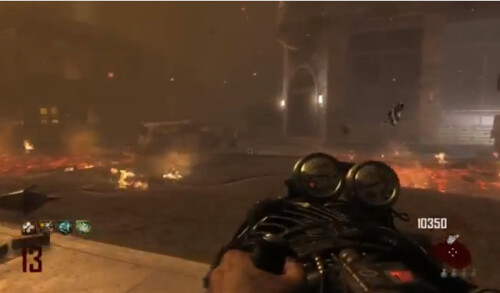
Last edited by Fabysk on Thu Oct 10, 2013 8:54 pm, edited 1 time in total.
-
CloudFlash

- Zandrone
- Posts: 1074
- Joined: Mon Jun 04, 2012 5:35 pm
- Location: Wonderland (except not really)
RE: Black setcor_setfade
If I were doing fog like in pic, I would make it brown instead of black. Just saying.
https://i.imgflip.com/i5tpe.jpg
*Hey, who wants to hear my solution to the modern world's problems? ^Me! %Me! @Me! #Me! *WELL TOO BAD @Did he just stab himself with this butcher knife? %Looks like it ^Hey, the pizza guy arrived! %Pizza! Yey

*Hey, who wants to hear my solution to the modern world's problems? ^Me! %Me! @Me! #Me! *WELL TOO BAD @Did he just stab himself with this butcher knife? %Looks like it ^Hey, the pizza guy arrived! %Pizza! Yey
RE: Black setcor_setfade
So tried out combining a brown setfade, setcolor, and a fadeto script and I got this
[spoiler]out of the fog zone
 [/spoiler]
[spoiler]in the fog zone with a brown fadeto script
 [/spoiler]
[spoiler]out of the fog zone
[/spoiler][spoiler]in the fog zone with a brown fadeto script
[/spoiler]
RE: Black setcor_setfade
Fabysk wrote: So tried out combining a brown setfade, setcolor, and a fadeto script and I got this
[spoiler]out of the fog zone
[spoiler]in the fog zone with a brown fadeto script
I think that's as close as you're going to get without some really complicated coding, it looks nice for what doom can handle and I think any HD stuff won't fit in with the rest of the doom textures. I'd work with thatFabysk wrote:It's a large sector. Forgot to mention that I wanted the fog somehting close to thisImpact wrote: It depends how big your sector is. If it's small try Sector_SetColor (<tag>,0,0,0). The 0,0,0 works on this and the sector should appear jet black. If for some reason that doesn't work, try 1,1,1.Spoiler: (Open)If that's not possible, then I'll go with using sector_setcolor and sector_setfade.

[spoiler]<N>Devon - <N>Impact - Dr Fetus[/spoiler]