Black setcor_setfade
Posted: Thu Oct 10, 2013 6:31 pm
Does anyone know how to make black fog in Doom Builder 2? This is for my mod. Making maps for the final release.
Leading the way in newschool multiplayer Doom online
https://zandronum.com/forum/
Not sure, but have you tried Sector_SetFade (0,0,0,0); ?Fabysk wrote: Does anyone know how to make black fog in Doom Builder 2? This is for my mod. Making maps for the final release.
Already tried that. Doesn't workImpact wrote: Not sure, but have you tried Sector_SetFade (0,0,0,0); ?
What are the numbers for a dark gray?Klofkac wrote: The fade IS defaultly black. The distance is "fading to darkness". It's been always like that.
The fog works because it fades to white, which looks just like a fog.
You should try useing SetFade with like very dark gray, it has some effect.
It look like there is no fog in the sector. I'll try to find more possibilities.Impact wrote: Sector_SetFade (<tag>,0,0,0) does nothing, just tried it, disregard what I previously suggested.
Try Sector_SetFade (<tag>,1,1,1), it does the job as best as I can find it.
It depends how big your sector is. If it's small try Sector_SetColor (<tag>,0,0,0). The 0,0,0 works on this and the sector should appear jet black. If for some reason that doesn't work, try 1,1,1.Fabysk wrote:It look like there is no fog in the sector. I'll try to find more possibilities.Impact wrote: Sector_SetFade (<tag>,0,0,0) does nothing, just tried it, disregard what I previously suggested.
Try Sector_SetFade (<tag>,1,1,1), it does the job as best as I can find it.
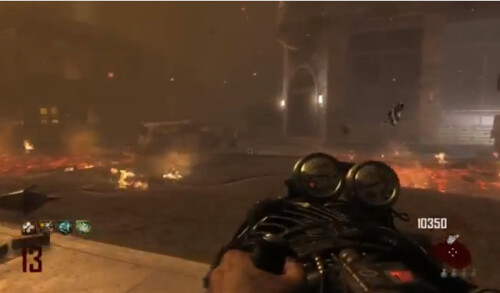
It's a large sector. Forgot to mention that I wanted the fog somehting close to thisImpact wrote: It depends how big your sector is. If it's small try Sector_SetColor (<tag>,0,0,0). The 0,0,0 works on this and the sector should appear jet black. If for some reason that doesn't work, try 1,1,1.
Spoiler: (Open)If that's not possible, then I'll go with using sector_setcolor and sector_setfade.
 [/spoiler]
 [/spoiler]
Fabysk wrote: So tried out combining a brown setfade, setcolor, and a fadeto script and I got this
[spoiler]out of the fog zone
[spoiler]in the fog zone with a brown fadeto script
I think that's as close as you're going to get without some really complicated coding, it looks nice for what doom can handle and I think any HD stuff won't fit in with the rest of the doom textures. I'd work with thatFabysk wrote:It's a large sector. Forgot to mention that I wanted the fog somehting close to thisImpact wrote: It depends how big your sector is. If it's small try Sector_SetColor (<tag>,0,0,0). The 0,0,0 works on this and the sector should appear jet black. If for some reason that doesn't work, try 1,1,1.Spoiler: (Open)If that's not possible, then I'll go with using sector_setcolor and sector_setfade.